Dive into the world of interactive learning tools where student engagement is at its peak, examples are aplenty, and the impact is undeniable. Get ready for an enlightening journey!
As we explore the benefits, types, implementation, and impact of interactive learning tools, prepare to be amazed by the possibilities they offer in educational settings.
Benefits of Interactive Learning Tools
Interactive learning tools play a crucial role in enhancing student engagement, making the learning process more dynamic and stimulating. By incorporating elements such as quizzes, games, simulations, and multimedia presentations, interactive tools capture the attention of students and encourage active participation in the learning process.
Enhanced Student Engagement
Interactive learning tools, such as educational apps, virtual labs, and online discussion forums, provide students with a hands-on and immersive learning experience. These tools enable students to interact with the content in a more meaningful way, leading to increased motivation and interest in the subject matter. For example, gamified learning platforms like Kahoot! and Quizlet make studying fun and engaging, allowing students to compete with their peers while reinforcing their knowledge.
Improved Retention and Understanding
The use of interactive learning tools has been shown to enhance student retention and understanding of complex concepts. By incorporating interactive elements like videos, simulations, and virtual reality, educators can present information in a more visual and interactive manner, making it easier for students to grasp difficult topics. For instance, platforms like Nearpod and Edpuzzle allow teachers to create interactive lessons with embedded quizzes and activities, ensuring that students actively engage with the material and retain key information.
Types of Interactive Learning Tools
Interactive learning tools come in various forms, each designed to engage students in different ways and cater to different learning styles. Let’s explore some of the main categories of interactive learning tools and how they can enhance the learning experience.
Simulations
Simulations are interactive learning tools that replicate real-world scenarios or processes. They allow students to experiment and make decisions in a risk-free environment. Simulations are effective in helping students understand complex concepts by offering hands-on experience. For example, a flight simulator can help aspiring pilots learn how to navigate an aircraft safely.
Games
Educational games are a fun way to engage students and reinforce learning material. By incorporating game elements such as points, levels, and rewards, students are motivated to actively participate in the learning process. Games can be especially effective in teaching subjects that require memorization or problem-solving skills.
Quizzes
Quizzes are interactive assessments that test students’ knowledge on specific topics. They provide immediate feedback, allowing students to identify areas where they need improvement. Quizzes can be in the form of multiple-choice questions, true/false statements, or fill-in-the-blank exercises. They are a great way to reinforce learning material and track progress.
Virtual Reality (VR) and Augmented Reality (AR)
VR and AR technologies offer immersive experiences that transport students to different environments or enhance their current surroundings with digital elements. These tools are particularly effective in subjects like science, history, and geography, where students can explore concepts in a more interactive and engaging way.
Interactive Whiteboards
Interactive whiteboards combine traditional teaching methods with digital technology, allowing teachers to create dynamic and interactive lessons. Students can actively participate in lessons by interacting with the content displayed on the whiteboard, making learning more engaging and collaborative.
Video Tutorials
Video tutorials provide visual explanations of complex concepts, making learning more accessible and engaging. Students can pause, rewind, and replay videos to reinforce their understanding of the material. Video tutorials are especially effective for visual and auditory learners who benefit from multimedia content.
Implementing Interactive Learning Tools
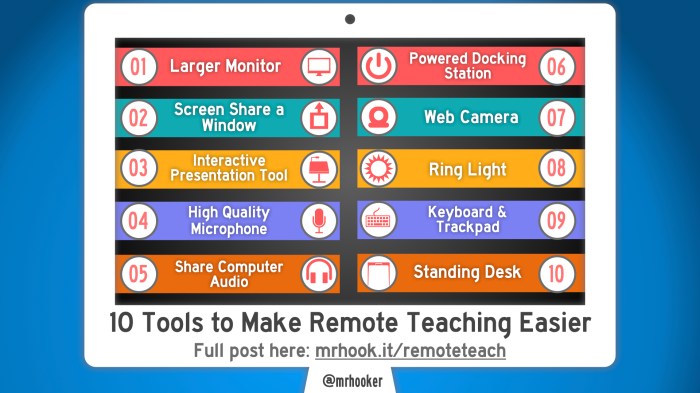
To effectively integrate interactive learning tools into lessons, educators can follow a step-by-step guide to enhance the virtual learning experience for students. By incorporating best practices, educators can overcome challenges faced when implementing these tools.
Step-by-Step Guide for Integration
- Identify Learning Objectives: Determine the specific goals and objectives you want to achieve with the interactive tools.
- Choose Appropriate Tools: Select interactive learning tools that align with the learning objectives and cater to the needs of your students.
- Integrate Tools Seamlessly: Incorporate the tools into your lesson plans in a way that enhances learning and engages students.
- Provide Guidance and Support: Offer proper instructions and support to students to ensure they understand how to use the tools effectively.
- Monitor Progress and Feedback: Continuously assess the impact of the interactive tools on student learning and adjust as needed based on feedback.
Best Practices for Virtual Learning Environment
- Utilize Interactive Platforms: Make use of platforms specifically designed for virtual learning that support a wide range of interactive tools.
- Encourage Collaboration: Foster a collaborative learning environment where students can interact with each other and participate in group activities using interactive tools.
- Provide Interactive Assessments: Use interactive tools for assessments to evaluate student progress and understanding in a more engaging manner.
- Offer Flexibility: Allow students to access interactive learning tools at their own pace and convenience to accommodate different learning styles.
Challenges and Solutions
- Technical Issues: Educators may face challenges with technical difficulties when implementing interactive tools. To overcome this, ensure proper training and support are provided to both educators and students.
- Resistance to Change: Some educators may resist incorporating new technologies into their teaching methods. Encourage professional development opportunities and showcase the benefits of interactive tools to overcome resistance.
- Time Constraints: Educators often struggle with time constraints when integrating new tools. Prioritize the most effective interactive tools that align with learning objectives to maximize impact within limited time constraints.
Impact of Interactive Learning Tools on Education and Training
Interactive learning tools have significantly revolutionized traditional teaching methods by incorporating technology to make learning more engaging, immersive, and effective. These tools have paved the way for a more interactive and dynamic learning environment, allowing students to actively participate in the learning process rather than passively receiving information.
Revolutionizing Traditional Teaching Methods
Interactive learning tools such as virtual simulations, gamified learning platforms, and educational apps have transformed the way educators deliver content and engage with students. These tools enable teachers to create interactive lessons that cater to different learning styles, making learning more accessible and enjoyable for students of all abilities.
- Virtual simulations provide hands-on learning experiences in a safe and controlled environment, allowing students to practice real-world skills and concepts without the need for physical resources.
- Gamified learning platforms use game elements to incentivize learning and motivate students to achieve educational goals, making the learning process more engaging and rewarding.
- Educational apps offer personalized learning experiences by adapting content based on individual progress and performance, catering to each student’s unique learning pace and style.
Interactive learning tools enhance student engagement, collaboration, and critical thinking skills, ultimately leading to improved academic performance and knowledge retention.
Personalized Learning Experiences
Interactive learning tools play a crucial role in providing personalized learning experiences by allowing students to learn at their own pace and in a way that suits their individual preferences. These tools enable educators to tailor lessons to meet the specific needs and interests of each student, fostering a more personalized and adaptive learning environment.
- Adaptive learning platforms adjust the difficulty level of content based on student performance, ensuring that each student receives targeted support and challenges to promote continuous growth and improvement.
- Interactive multimedia content caters to diverse learning styles by presenting information in various formats such as videos, animations, and interactive simulations, accommodating different preferences and enhancing overall comprehension.
By offering personalized learning experiences, interactive learning tools empower students to take ownership of their learning journey and develop a deeper understanding of complex concepts.
Improving Knowledge Retention and Application
Interactive learning tools are instrumental in improving knowledge retention and application by engaging students in active learning experiences that promote critical thinking, problem-solving, and real-world application of concepts. These tools challenge students to think creatively, analyze information, and apply their learning in practical scenarios, enhancing their ability to retain and apply knowledge effectively.
- Simulation-based learning activities allow students to apply theoretical knowledge in simulated real-world situations, preparing them for practical challenges and enhancing their problem-solving skills.
- Collaborative learning tools facilitate peer-to-peer interaction and group projects, encouraging teamwork, communication, and knowledge sharing among students, which in turn reinforces learning outcomes and promotes long-term retention.
Interactive learning tools bridge the gap between theoretical knowledge and practical application, equipping students with the skills and competencies needed to succeed in real-world scenarios and future endeavors.
Closure
In conclusion, interactive learning tools are not just tools but catalysts for a transformative educational experience, paving the way for a future where learning is engaging, effective, and personalized.
FAQ Compilation
How do interactive learning tools enhance student engagement?
Interactive learning tools make learning fun and engaging by allowing students to actively participate in the learning process through games, simulations, and quizzes.
What types of interactive learning tools cater to different learning styles?
Tools like simulations cater to visual learners, while interactive games may appeal more to kinesthetic learners. Quizzes are great for auditory learners.
What challenges do educators face when implementing interactive learning tools?
Educators may face challenges like resistance to change, technical issues, and the need for proper training to effectively integrate these tools into lessons.